Kalynt. Download
2.0 — the first stable releaseOPEN SOURCE. LOCAL FIRST.

Code with AI.
Keep it local.

A desktop IDE for developers who want control.
Run AI on your machine, bring your own cloud key,
and build together, peer to peer.

KALYNT / YOUR WORKSPACE YOUR MODELS. YOUR CHOICE.
Kalynt's editor with project explorer, terminal, and AI agent panel
Windows · macOS · LinuxNo Kalynt subscription. No account required.AGPL-3.0 licensed ↗

A complete IDE.
A little more independence.

Open a real project. Edit, run, debug, and use Git in one place. Bring AI into the work when you need it, with control over where your requests go.

AI ON YOUR TERMS

Choose where
the thinking happens.

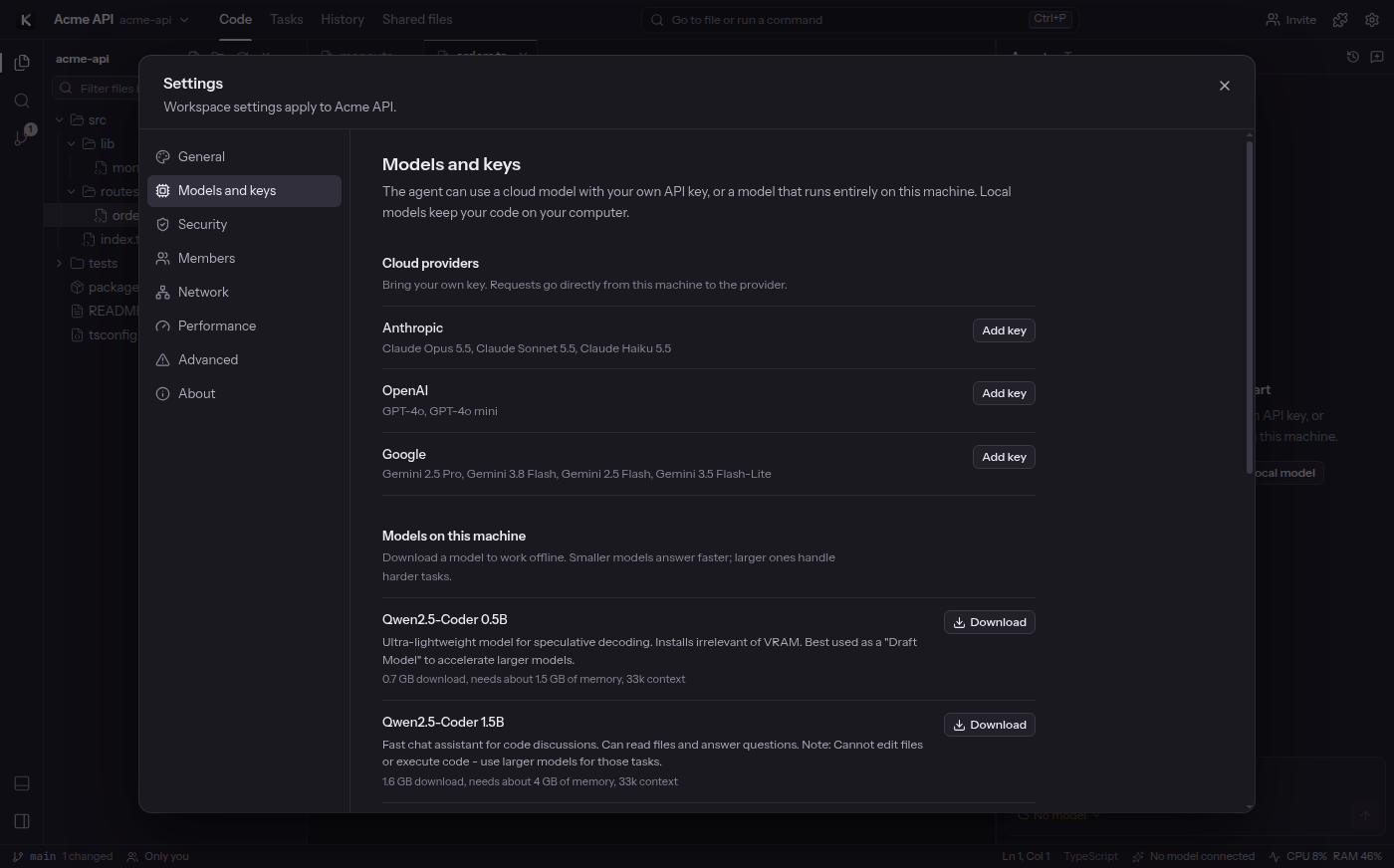
Download a local model inside Kalynt to keep AI requests on your machine. Or use your own key for Claude, OpenAI, Gemini, DeepSeek, Kimi, or GLM.

Local models use your RAM, GPU, and disk space. Cloud providers charge for their own usage. You choose the tradeoff.

Find your starting point ↗
Models and keys settings for cloud providers and local model downloads
Models and keys · Kalynt 2.0
AN AGENT YOU CAN FOLLOW

From a request
to a reviewed change.

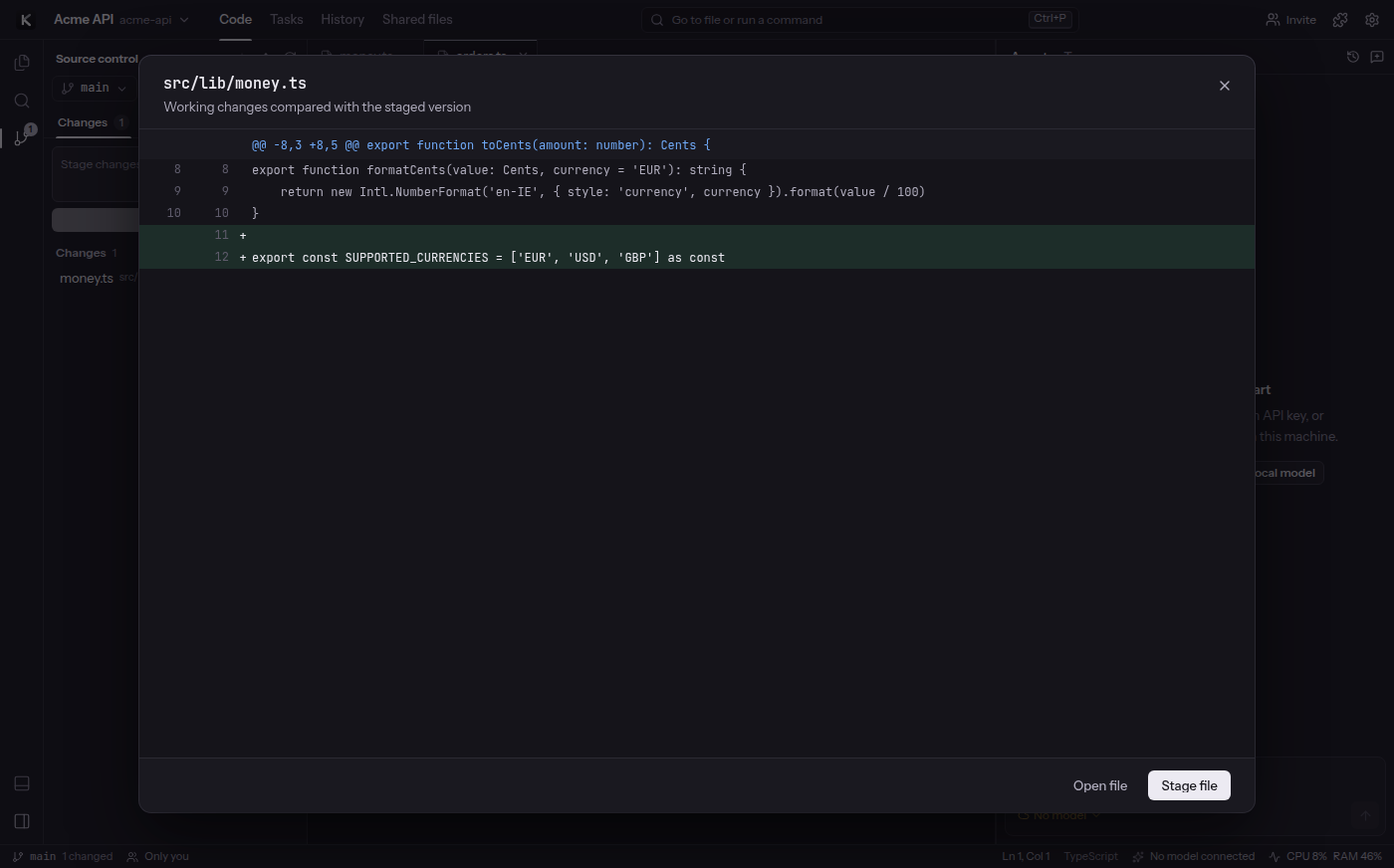
The agent can read your project, edit files, run commands, and check its work. Keep the changes you want. Undo a run when you need to.

Side-by-side source control diff showing individual code changes for review
A real product screenshot. Results depend on your model, hardware, and task.
  1. 01

    Give it context

    Open your folder and mention relevant files with @. Start with one focused task.

  2. 02

    Stay in control

    Use Ask before changes to review edits and commands before they run.

  3. 03

    Review the result

    Read the diff, run your project's tests, and keep or undo the agent's work.

BUILD TOGETHER

Same project.
Shared momentum.

Invite a teammate with a link or room code. Edit together with peer-to-peer sync, team chat, shared tasks, and file sharing.

Set a room password to enable end-to-end encryption. Anyone with an unprotected room's link can join. Peers must be online to sync; network restrictions can affect connectivity.

Read the security details ↗
Collaboration view with workspace members and invitation controls
Your workspace, shared directly between peers.

A clear place to start.

Try Kalynt alongside your current editor. Start with a small project and one useful task.

  1. 1

    Install and open a folder

    Download your platform's installer below. Launch Kalynt and select Open folder from the home screen.

  2. 2

    Choose local AI or a cloud key

    Open Settings → Models and keys. For local AI, download and load a model that fits your memory. For cloud AI, add your provider's API key.

    Start small, expect honestly.Small local models are useful for explanations and code chat. Larger models are better suited to editing and agent tasks. Reserve memory for your OS and project; model files require additional disk space.
  3. 3

    Ask something you can verify

    Choose your model in the agent panel. Start with a prompt like this, then check the answer against the code:

    Explain how this project starts. Point me to the entry file and the command to run it. Don't change any files.

Read the setup guide ↗
MAKE ROOM FOR YOUR OWN WORKFLOW

Your next workspace.

Version 2.0.0
Free and open source.

Installers are approximately 200–550 MB. Local models download separately.

Release notes & all downloads ↗

Linux 2.0 was tested on Ubuntu. Windows and macOS packages are built by CI; check the release notes for platform details. Downloading the IDE does not include a cloud AI subscription.

Good questions.

Is Kalynt really free and open source?

Kalynt is licensed under AGPL-3.0. You can inspect the source, build it yourself, and contribute. There is no Kalynt subscription. External cloud AI providers may charge you for API usage.

Read the license ↗
Does my code leave my computer?

With a local model, AI inference runs on your machine. If you choose a cloud model, the context needed for your request is sent directly to that provider. Collaboration shares workspace data with the peers you join. Model downloads, updates, and agent web searches also require network access.

What hardware do I need for local AI?

It depends on the model and context size. The model manager shows estimated memory and download requirements before you download. Smaller models handle simpler tasks; larger coding agents need substantially more memory. Leave RAM for your operating system, IDE, and project. Supported GPUs can accelerate inference; CPU inference is available but can be slower.

Can I keep using my current editor?

Yes. Kalynt opens ordinary project folders and uses your existing Git repository. Try a small task alongside your current tools. Extensions come from Open VSX or .vsix files; compatibility varies because Kalynt implements a subset of the VS Code API.

How do I get help or contribute?

Report a reproducible issue on GitHub, ask a question in Discussions, or read the contribution guide. Include your Kalynt version, operating system, model or provider, and the steps you tried. Keep API keys and private code out of reports.

BUILT IN THE OPEN

A workspace you
can make your own.

Meet the project ↗Share what works. Tell us what doesn't. ↗